
Quick Answer: AC Infinity controllers offer eight modes: OFF, ON, AUTO, VPD, Timer to ON, Timer to OFF, Cycle, and Schedule. For most cannabis grows, AUTO mode handles veg and early flower, VPD mode handles mid to late flower, and Schedule mode manages lights-off ventilation. The Controller 69 Pro is the model that unlocks VPD mode.
I spent the first two weeks with my Controller 69 Pro stuck on ON mode at speed 5 because the manual reads like a spec sheet rather than a grow guide. Every mode was described. None of them explained when to actually use it.
That is the gap this article fills.
From Seed to Smoke, Done Right
The Only Grow Guide You’ll Actually Need
This article covers one part of the grow. The Complete Marijuana Grower’s Guide covers all of it, from choosing the right seeds through harvest, drying, and a proper cure.
Seeds, lighting, nutrients, pest control, common mistakes, legal considerations by region, and troubleshooting. Everything a beginner needs to take a seed to frosty, sticky, finished bud, in one practical guide.
Get the Full Grower’s Guide →Table of Contents
The Eight Modes, Simply Put
AC Infinity controllers run eight modes. Each one answers a different question about how you want the fan to behave.
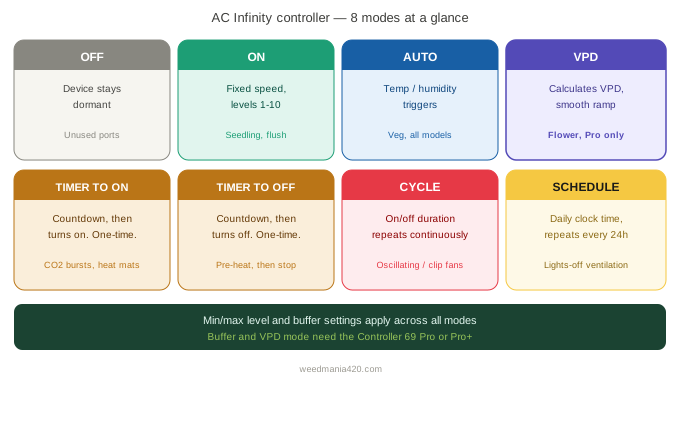
OFF mode sets the device to turn off completely. Use it when a port is unused or when a connected device should stay dormant until you switch modes.
ON mode runs the fan continuously at a fixed speed from level 1 to 10. It is the simplest setting and the right choice when you want manual control without triggers.
AUTO mode sets temperature and humidity triggers that activate the fan. The fan ramps up when either reading crosses your set threshold, and drops back when it returns to range.
VPD mode works the same way but reads vapour pressure deficit instead of raw temperature and humidity. It is available on the Controller 69 Pro and Pro+ only.
Timer to ON counts down and turns the device on once the countdown ends. Single use, not repeating.
Timer to OFF counts down and turns the device off once the countdown ends. Useful for timed one-off events.
Cycle mode sets an on and off duration that repeats continuously. The fan runs for your set period, stops for your set period, then repeats.
Schedule mode sets a daily clock time for the fan to turn on and off. It repeats every 24 hours automatically.
The Mode That Matters Most in Flower
VPD mode is the reason serious growers buy the Pro model over the base Controller 69.
Rather than reacting to a single temperature or humidity reading, it calculates the vapour pressure deficit at the canopy and adjusts fan speed to keep that number inside your target range. As VPD rises above your set trigger, the fan increases speed. As it falls below, the fan pulls back.
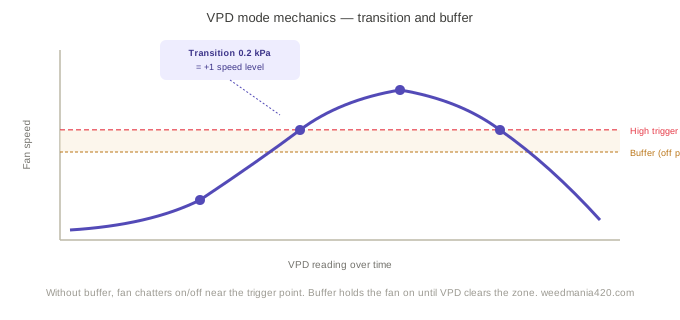
The transition setting controls how gradually the fan ramps. Set a VPD transition of 0.2 kPa and the fan increases by one speed level for every 0.2 kPa the reading drifts above your high trigger. It is a proportional response rather than a binary on/off switch.
This matters in flower because a fan that slams to full speed every time humidity ticks up by 2% creates canopy turbulence that stresses buds. VPD mode produces smooth, measured airflow adjustments that keep the environment stable without jarring the plant.
For target VPD numbers by growth stage, the cannabis VPD chart covers the full range from seedling through late flower.
AUTO Mode: The Workhorse for Veg
AUTO mode is available on every Controller 69 model, including the base unit.
You set a high temperature trigger, a high humidity trigger, or both. When either reading meets your threshold, the fan activates. When both readings fall back below the threshold, the fan returns to minimum speed.
The practical setup for veg: high temperature trigger at 80°F, high humidity trigger at 70% RH, minimum level at 3, maximum level at 8. The fan idles at speed 3 during stable conditions and climbs toward 8 when the tent heats up or humidity rises after watering.
AUTO mode does not calculate VPD. It reads raw temperature and humidity as independent variables. That is fine for veg when environmental swings are manageable, but it becomes less precise in flower when the relationship between temperature and humidity matters as much as either number alone.
Schedule Mode for Lights-Off Ventilation
This one is underused and genuinely valuable.
Bud rot almost always develops during the dark period. Transpiration slows, humidity rises, and if the fan is also idling low because temperature dropped with the lights, the tent goes still exactly when it should not.
Schedule mode lets you set a specific fan speed to run during the dark period independently of whatever AUTO or VPD triggers are doing during lights-on. Set it to run at level 5 from lights-off to lights-on, and the tent stays ventilated regardless of what the temperature and humidity readings are doing overnight.
Pair this with a humidity controller running a dehumidifier overnight and late flower bud rot becomes a structural problem you have solved rather than a risk you are hoping to avoid.
Cycle Mode: Best for Oscillating Fans
Cycle mode suits clip fans and oscillating fans rather than inline fans.
Running an oscillating fan at constant speed all day does move air, but it also creates consistent pressure on the same leaf surfaces. Cycle mode runs the fan for a set period, pauses, then repeats. The result is airflow that varies naturally rather than blowing continuously at the same intensity.
A useful starting point: 15 minutes on, 5 minutes off. The canopy gets a rest period between airflow bursts, which more closely mimics outdoor wind patterns than a fan running without interruption.
Our Pick
AC Infinity Controller 69 Pro
VPD mode, buffer setting, four independent ports, WiFi app with data graphs. The controller that makes flower-stage environment management genuinely automatic.
Check Price on Amazon →Timer Modes: Single-Use Triggers
Timer to ON and Timer to OFF are the simplest modes on the controller and the least used in a typical grow setup.
Timer to ON works well for CO2 bursters, heating mats, and any device you want to activate after a delay without being present. Set the countdown, walk away, and the device activates when it ends.
Timer to OFF suits a situation where you want a device running now but need it to stop after a set duration. Heat up the tent before lights-on and set a timer to cut the heater off two hours in.
Neither mode repeats. Once the countdown finishes, the mode is done. Use Schedule or Cycle if you need daily or continuous repetition.
Max and Min Level Settings
Every mode is bounded by the max and min level settings. They run across all modes, not just one.
The minimum level is what the fan runs at when the trigger is inactive. Set it to 0 and the fan fully stops between trigger events. Set it to 3 and the fan always maintains a baseline of airflow even when the environment is within range.
Never set the minimum to 0 in flower. A tent that goes fully still during stable conditions creates exactly the stagnant air pockets where mould establishes. A minimum of 2 or 3 keeps air moving at all times.
The maximum level caps how hard the fan can push. A fan that slams to level 10 every time humidity spikes creates unnecessary noise and mechanical wear. Set the maximum to 7 or 8 in most grows and let the transition setting handle the gradient between minimum and maximum smoothly.
Which Mode to Use at Each Stage
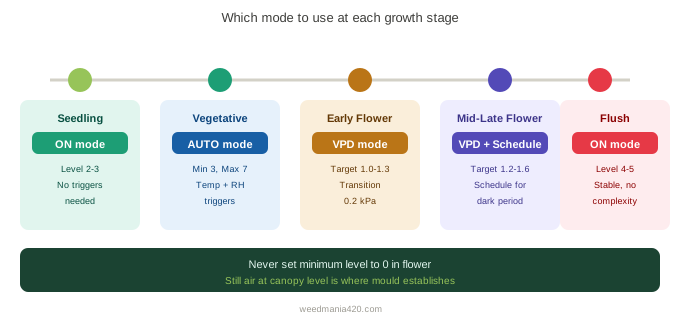
Seedling: ON mode at level 2 to 3. No triggers needed. Gentle, consistent airflow while the root system establishes.
Veg: AUTO mode with high temperature and humidity triggers. Minimum level 3, maximum level 7. Add a VPD controller if you have the Pro model.
Early flower: AUTO or VPD mode. Set the high VPD trigger for your early flower target of 1.0 to 1.3 kPa. Transition setting at 0.2 kPa for smooth ramp-up.
Mid to late flower: VPD mode. Target 1.2 to 1.6 kPa. Add a Schedule mode programme on a second port to maintain speed 5 during the dark period overnight.
Flush period: ON mode at level 4 to 5. Stable, consistent airflow during the final two weeks. No trigger complexity needed.
The Buffer Setting
The buffer setting prevents the fan from cycling on and off rapidly when readings fluctuate around the trigger point.
Without a buffer, a fan set to trigger at 1.1 kPa VPD turns on at 1.1, off at 1.09, on again at 1.11, off again at 1.09. In a real tent, VPD bounces around the trigger point constantly. The fan ends up chattering, which shortens motor life and creates erratic airflow.
Set the buffer to 0.1 or 0.2 kPa and the fan stays on until VPD drops 0.2 kPa below the trigger before turning off. The result is stable on and off behaviour rather than rapid switching.
The buffer setting is available on the Controller 69 Pro and Pro+ only.
Connecting to the App
The physical controller handles all eight modes without the app. The app unlocks advance programming, data graphs, remote alerts, and the ability to build trigger combinations that the physical buttons cannot create.
For most growers, the physical controller is enough. Connect to the app if you want historical data to diagnose environment problems, or if you want to set alerts that notify you when temperature or humidity crosses a threshold while you are away from the tent.
The app connects over 2.4 GHz WiFi only. A 5 GHz network will not pair. This is the single most common setup frustration reported across grow communities, and it is always resolved by switching the phone to the 2.4 GHz band before pairing.
Which Controller Model Do You Need
Controller 69 base: OFF, ON, AUTO, all timer modes, Cycle, Schedule. No VPD mode. Suits beginner to intermediate grows where AUTO mode meets the environmental management needs.
Controller 69 WiFi: Same as base plus WiFi app connectivity. Worth the small price difference if you want remote monitoring.
Controller 69 Pro: Adds VPD mode and the buffer setting. The right choice for flower-stage precision. This is the model referenced throughout this guide.
Controller 69 Pro+: Eight ports instead of four. Suits larger setups with multiple fans, lights, and climate devices all running from one controller.
Our Pick
AC Infinity Controller 69 Pro
VPD mode, buffer setting, four independent ports, WiFi app with data graphs. The controller that makes flower-stage environment management genuinely automatic.
Check Price on Amazon →FAQ
What is the difference between AUTO mode and VPD mode? AUTO mode triggers on raw temperature and humidity readings independently. VPD mode calculates vapour pressure deficit and responds to that combined number. VPD mode is more precise for flower because it accounts for the relationship between temperature and humidity rather than treating them as separate variables.
Can I run two modes at the same time? Each port runs one mode. To run VPD mode on your inline fan and Schedule mode for overnight ventilation, connect each device to a separate port and programme them independently.
What speed should I run my inline fan in veg? Start at level 4 in AUTO mode with a minimum of 2. Adjust based on how far tent temperature drifts from your target during lights-on. The goal is enough airflow to exchange tent air every one to three minutes. Use the grow tent ventilation calculator to confirm your fan is sized correctly before worrying about speed settings.
My fan keeps switching on and off rapidly. How do I fix it? Add a buffer setting of 0.1 to 0.2 kPa or the temperature equivalent. This prevents the fan from responding to every small fluctuation around the trigger point. Buffer is available on Pro and Pro+ models only.
Does the Controller 69 Pro work with non-AC Infinity devices? The UIS ports control AC Infinity devices with variable speed. Non-UIS devices plugged into a standard outlet can receive on/off signals but not variable speed control. A humidifier or dehumidifier plugged into a UIS port will turn on at full power when triggered rather than ramping up through levels.